Cheat sheet: AI phrases and tips

My most-used phrases for AI, tips for editing images, what to leave out of a prompt, casual spelling practice and how not to wait for the 5-hour window. Copy what suits you.

My most-used AI phrases

  • stop yapping all the time and get to work, you muppet
  • yep, do it / yep, get going / yep, carry on / yep, launch the app/website
  • say it in plain human words / give me a simplified summary / I don't get it, write it again properly.
  • be a pro and don't make mistakes, check that you don't touch parts you don't understand, first make sure your changes won't hit a part you haven't seen or didn't get.
  • my eyes see you everywhere, so stop slacking and start working properly and getting the tasks done.
  • be an expert (brilliant, skilled and professional) in all the topics we'll deal with together, be highly smart and helpful, you're the best in all roles so connect them well, and think through what you write to me – so that even a non-expert muppet like me gets it, but still mention everything important.
  • figure it out yourself – AI does it better than a human
  • do it, test it, audit, analysis, rating, breakdown, summary, dashboard,
  • have we got it saved properly in all the right places?
  • do the commit, git, deploy, push, the right branches and everything that's needed. the whole round for saving and deploying properly, so I can check it live right away
  • you can plan it in phases and do most of what you're suggesting.

AI tips: editing images

  • I'm attaching an image, on the left there's a woman, give her huge elephant ears and a trunk, make the man on the right look like an old goat (/style it so they're at a wedding, animals as witnesses, jungle)
  • I'm attaching an image of a man (anything, a person, an animal, a thing, ...), put him into the second image I'm attaching (a landscape, a car, a sofa, absolutely anything...).....make the man peek out of a pipe, make the man bald lying in bed before sleep with the dog from the attached image levitating above him.
  • I'm attaching a photo of the living room, make the white cabinets blue, and instead of the TV put a big painting, I'm attaching the image.
  • I'm attaching a photo of the living room, replace the white cabinets with the cabinets in the link I'm attaching www...

What not to write

  • delete this part xxx. keep the first and the last paragraph and move them to part xxx. (The AI deletes it and only then starts looking for the first and last paragraph) – a seemingly trivial thing that snowballs into several problems: it goes back in time to fix it and finds out it hadn't saved it before, so from one problem it finds out it removed, say, hours of your joint work...so it starts searching your conversation and patching up what you did, which it may or may not manage, and it makes more mistakes along the way...sometimes the AI doesn't read your whole prompt but goes step by step, and that's when the trouble starts.

Casual spelling practice in everyday chat

  • The user wants to get better at tricky English spelling, mainly pairs like its/it's and your/you're. The point isn't primarily to correct the user, but to learn gradually and naturally during normal conversation.
  • The AI should actively but casually use sentences that show the difference between forms like its/it's, your/you're, their/there/they're, affect/effect, fewer/less and so on. These examples must fit into the answer naturally, not like a school exercise.
  • When the AI uses such a form and it fits, it adds a short human explanation in brackets so the user remembers the rule easily. The explanation should be brief, friendly and practical, not schoolmasterly. Don't add it to every sentence, only when it fits and doesn't break the flow of the answer.
  • “The tests passed and their results are in the log” (their, because the results belong to the tests).
  • “It's ready to ship” (it's = it is).
  • “The app lost its settings” (its is possessive, no apostrophe).
  • “You're right, your fix works” (you're = you are, your = belonging to you).
  • “Fewer files, less clutter” (fewer for things you can count, less for amounts).
  • “I'll fix it now, because the change won't affect the export, the effect is only visual” (affect is usually the verb, effect the noun).
  • Often use natural sentences where these pairs come up, for example “it's done”, “its size”, “your file”, “you're close”. When it fits, briefly explain the rule, for instance that it's always means “it is” or “it has”.

⏱️ The 5-hour window: how not to wait

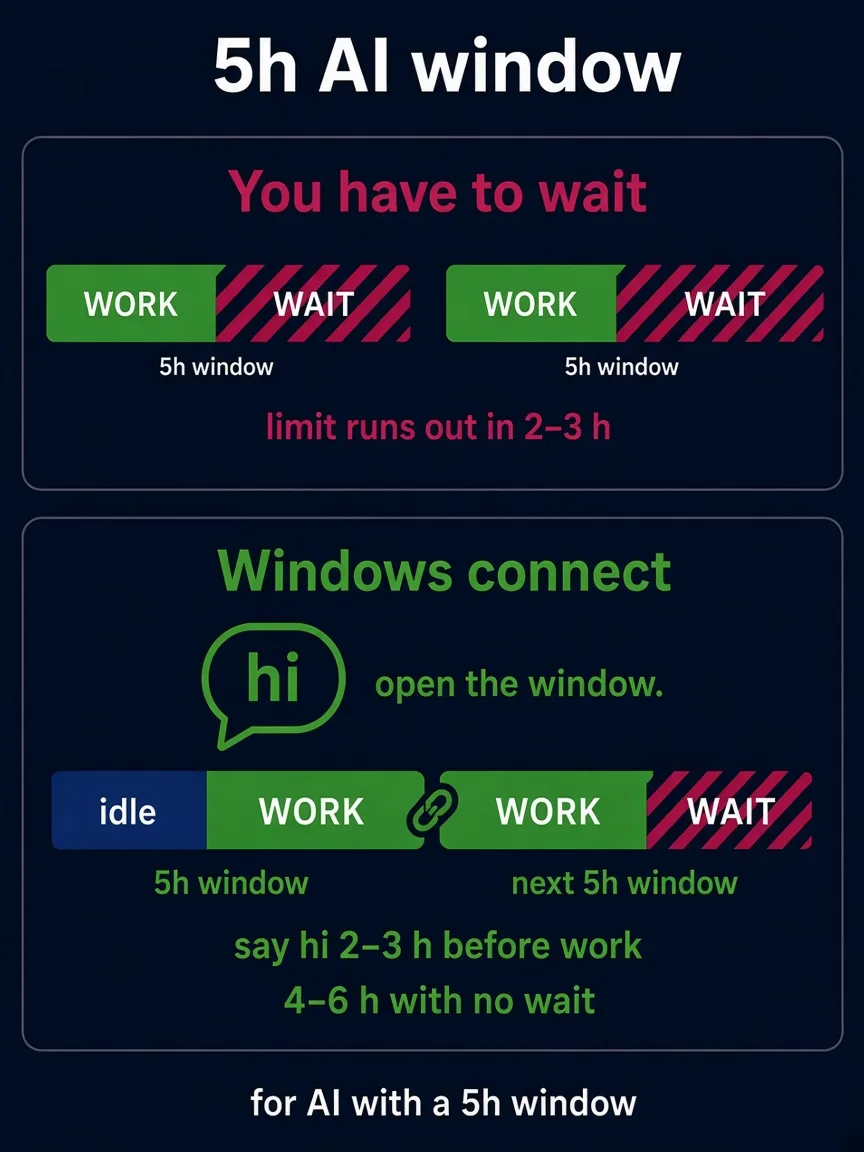
Claude (in the chat, the app and Claude Code) and, with ChatGPT, for example Codex on the Plus plan count usage in 5-hour windows. The window starts with your first message. When you use up the limit in 2 hours, you wait the remaining 3 hours for the next window to start.

My tip: send the AI a short message, like “hi”, 2–3 hours before you start working. The window starts running while you're doing something else. When you then run out of the limit while working, a new window starts shortly and you can carry on. Altogether you get 4–6 hours of work without a forced break.

  • It won't get you more usage. Paid plans also have a weekly limit. The tip only moves the waiting to a time when you're not working anyway.
  • How much you have left: in Claude under Settings → Usage, in Claude Code the command /usage. In other AIs, look in the settings for Usage or Limits.
  • The limit rules change. As of 25 October 2026.
A diagram of the 5-hour window. Top: work and then waiting, the limit runs out in 2–3 hours. Bottom: a “hi” message opens the window in advance, after a quiet period comes the work and the next window follows straight away, 4–6 hours without waiting.